Three systems in development, dozens of vendors, and Jira, which was used by just one department. Find out how the Czech Football Association brought order to its projects and launched the Fotbal TV streaming platform in half the planned time.
Jan Hýsek IT consultant, FAČR
At the FAČR, Jan Hýsek is in charge of developing three systems: the association-wide information system, the results app at fotbal.cz, and the Fotbal TV streaming platform. When he joined the association two and a half years ago, he encountered a problem familiar to anyone who manages multiple tasks at once: fragmented communication.
Tasks were scattered across various platforms, and switching between projects took more energy than the work itself. The IT department was running on Jiřa, but over time it became clear that only the IT department was using it. For everyone else, it was too cumbersome. They used it infrequently and reluctantly, so records were sometimes missing from it.
And communication with external suppliers? That took place where it usually does: via email. How does Honza Hýsek sum up the time before Freelo? ””I’d rather not even think about that,”” says cheerfully.
How did Honza figure out that they needed Freelo, of all things? You could say it was a complete coincidence. He came across it on social media, so he went to check out the website, and the testimonials caught his attention. Specifically, one of the case studies, in which he recognized his own situation.
So he decided to give it a try. And he was clear about one thing right from the start: the new tool must not end up like the previous one—that is, as a tool used by just one department.
Honza Hýsek didn't just go with the first result from a search engine. In addition to the robust Jira, which he was familiar with from experience, he also tried out Microsoft Planner. However, it lacked notifications and task dependencies, so he quickly ruled it out.
I felt there was a lack of organization in our tasks and in switching between projects. My main motivation was to bring order to the projects—so that we would know exactly where we stood, where we were headed, and where we were running into bottlenecks due to capacity constraints.Jan Hýsek – IT consultant, FAČR
I wanted a tool that could be used across the entire soccer association. In my opinion, Jira is geared more toward IT departments. And that's not what I wanted. We needed a comprehensive system for everyone.
We found Freelo to be more intuitive and simpler. Other pluses included the price, Czech-language support, and visual features like the Timeline and status colors. Personally, I was also won over by the ability to submit suggestions for improvement and see that they’re actually being acted upon.
Fotbal TV wasn't the smallest or safest project on which to test the new tool. At the same time, however, it was the most interesting, because it brought together vendors of several systems as well as internal staff. So Honza was able to test both groups at once with a single pilot.
At FAČR, they set up their onboarding process on their own, and it worked out. You don't have to navigate this journey alone. Our team will walk you through setting up Freelo step by step.
There was already one attempt to implement Freelo, and it didn't work out. At the time, it was argued that Teams was sufficient, even though it addresses different scenarios—none of which involve work organization.
A different concern arose a second time: that the new tool would create more administrative work. That concern lasted a month, maybe two. Then my colleagues got used to the new system, and that was the end of the debate.
We wanted to see how individual suppliers and our in-house staff would react to this.
We don't take a prescriptive approach to this. We want only those people for whom it makes sense to use it.
At first, there were concerns about increased administrative work, but those concerns subsided after a month or two. My colleagues have gotten used to the way things are organized here.
Honza Hýsek showed us what his day-to-day work at Freelo looks like—from a new colleague’s first day all the way through release planning.
Jan Hýsek IT consultant, FAČR
Every new user receives one practice task as part of the training program. In it, they’ll read the basic methodology and immediately try out what they’ll need on a daily basis using that very task : assigning an owner, setting a deadline, and working with tags. In the final step, they’ll close the task and reassign it back to Honza. That concludes the onboarding process.
At the FAČR, the rule is that a task without a deadline is not a task. That is why even the first, practice task is assigned a deadline.
Three times a week, 30 minutes. Using the Dashboard and a combination of filters , Honza Hýsek can view a specific person’s tasks and immediately see how they’re making progress on their to-do list. This way, meetings aren’t held up by people recounting what everyone has been doing.
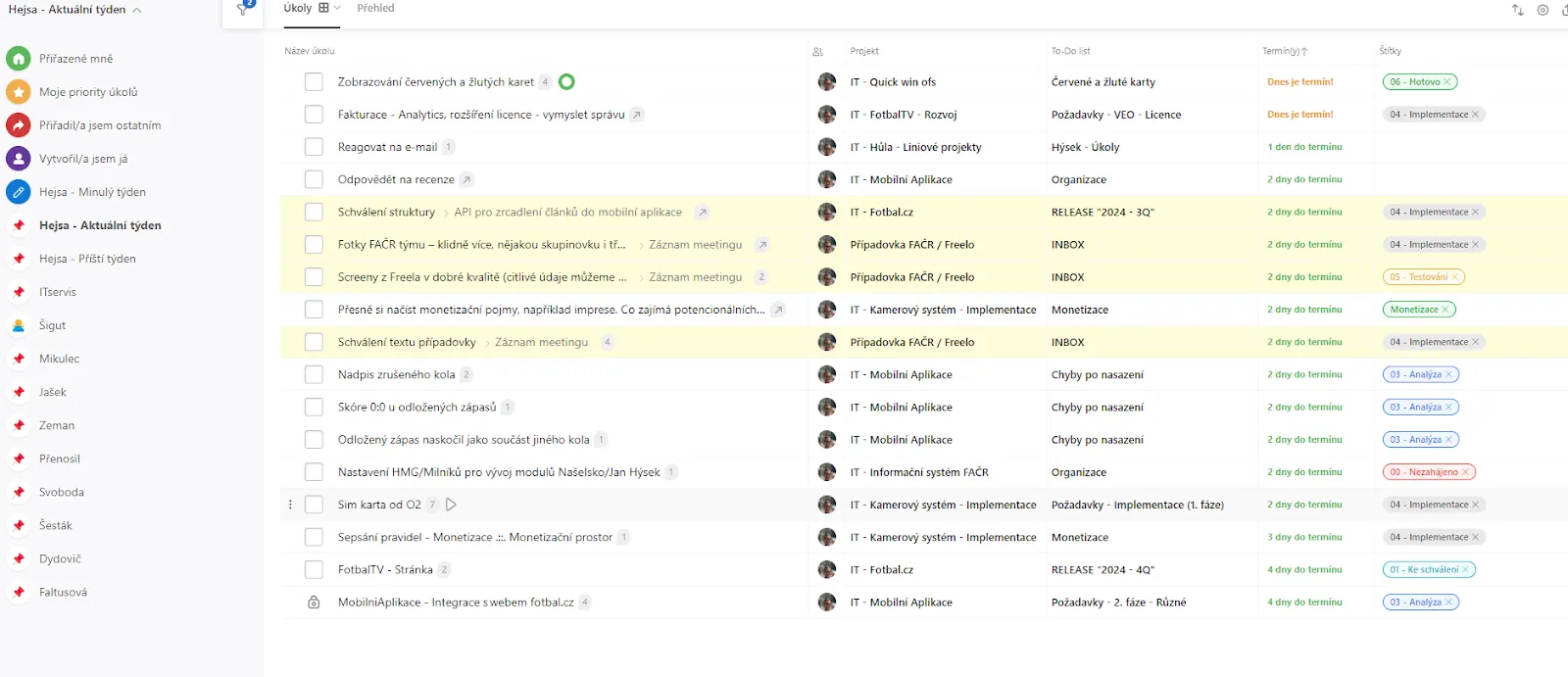
Honza organizes his filters by person and by week. So before his stand-up set, he just switches between his pre-set views and doesn't have to reconfigure anything from scratch.
Tagsin FAČR indicate the status of a task. When a task is up for approval, Honza assigns it to a specific person. That person either updates the tag themselves or writes in the comments” ”” (approved) or”” ” (approved), which signals to Honza to move the task forward.
In the past, communication with external vendors took place via email. The downside was that no one had a clear overview of what had been assigned, what was being worked on, and how much work was actually pending with the vendor.
Today, Freelo has their own supplier projectthat they manage themselves. All requests are routed through it, and the FAČR can see how busy each vendor is and which tasks require a response. Freelo has 17 external collaborators, for whom they use the”Guests” feature.
And this is exactly where it paid off that the pilot was filmed at Fotbal TV. According to Honza Hýsek, having the suppliers of several systems and the in-house staff all in one place helped meet the deadline.
We were able to finish it in half the planned time only thanks to Freelo.
Honza Hýsek has a clear plan for the next step. He wants to increase the number of active users and expand Freelo from business projects to everyday management tasks. The goal is for users to create their own tasks, rather than having them assigned by someone else.
We want the departments not only to manage specific business projects, but also to oversee people in a line management capacity.
Try Freelo for free. If anything, we're here for you on chat, on the phone, for an online consultation.