
Freelo Help Account & Settings Change your plan

Change your plan

Freelo currently offers one free plan and four paid plans - Team, Business and Enterprise.

If your current plan is not enough for you and you need to create more projects, use more data space or use roles Admin & Project manager features, you can easily change it by clicking on Change plan in your profile menu.
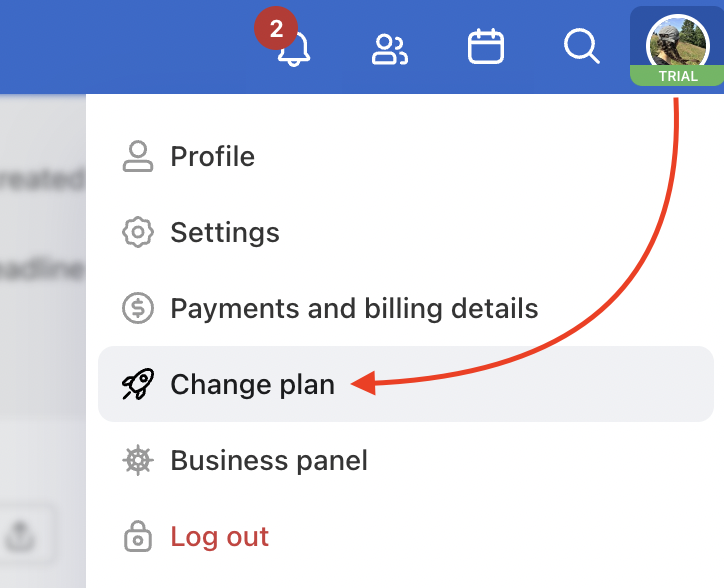
Example of how to change your plan.

Then, choose and order the plan you need.
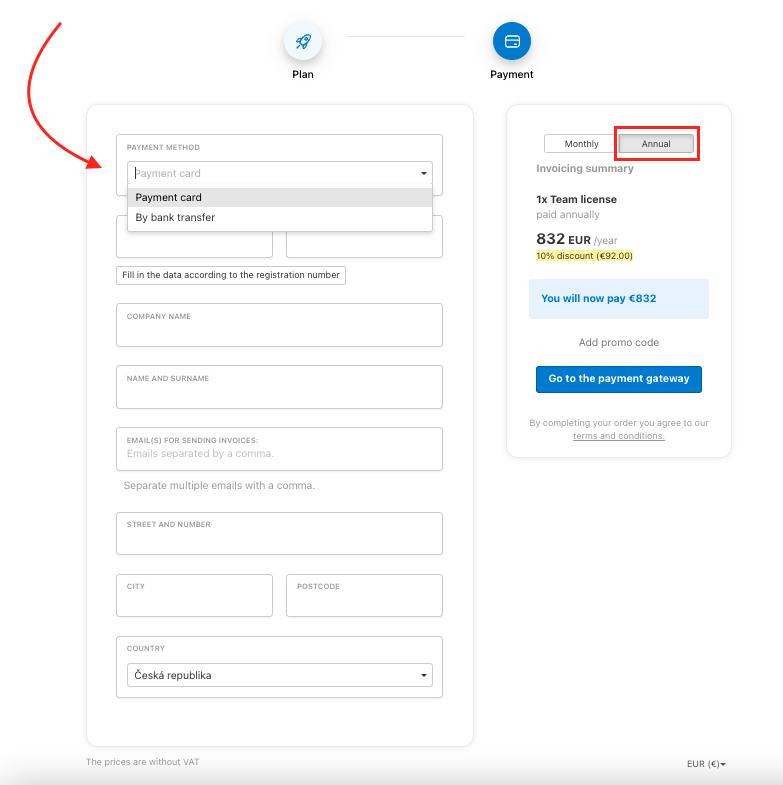
How to order the paid plan in Freelo.
Last updated:
Freelo Help Account & Settings Change your plan

Work with Projects

14 Articles

Work with To-Do lists

10 Articles

Work with Tasks

30 Articles

Account & Settings

20 Articles

Due dates & Notifications

8 Articles

Files & Sharing

8 Articles

Users & Permissions

7 Articles

Finances & Invoices

5 Articles

Reports & Time tracking

5 Articles

Third-Party Integrations

13 Articles

Business panel

6 Articles

Start with Freelo

1 Articles