
Got dozens of tasks in a To-Do list and need to quickly see what's most urgent? Task sorting lets you order the contents of each To-Do list by deadline, priority or creation date – with a single click, no manual reshuffling needed.
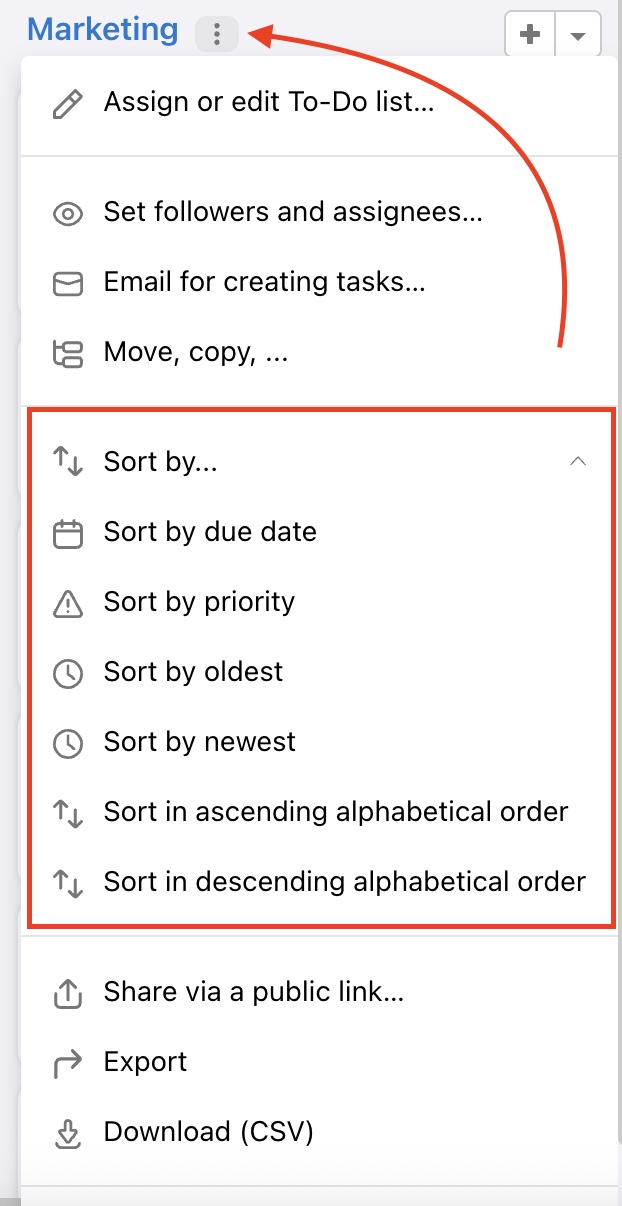
You might want to systematically order your tasks in one To-Do list. In particular To-Do lists you can setup the tasks order according to:
- Due date
- Task priority
- Oldest tasks first
- Newest tasks first
- Sort ascending (A-Z)
- Sort descending (Z-A)
To change the order, go to the project detail view. In the specific To-Do list, click the three-dot menu next to the list name. There, you’ll find a section where you can choose the sorting option.
It can be set for one To-Do list at the time.
Practical use
- Morning planning – sort tasks by deadline and instantly see what needs to get done today
- Sprint or weekly plan – sorting by priority shows what's critical and what can wait
- Checking newly added tasks – sorting from newest shows what was added since your last login
- Overview in a large To-Do list – alphabetical sorting helps you quickly find a specific item among many similar tasks
Last updated: