Tasks, stopwatches and timesheets on one command. With Freelo CLI you work from the command line, from scripts, or through an AI agent. Claude Code, Cursor, and others interact with Freelo at your command.
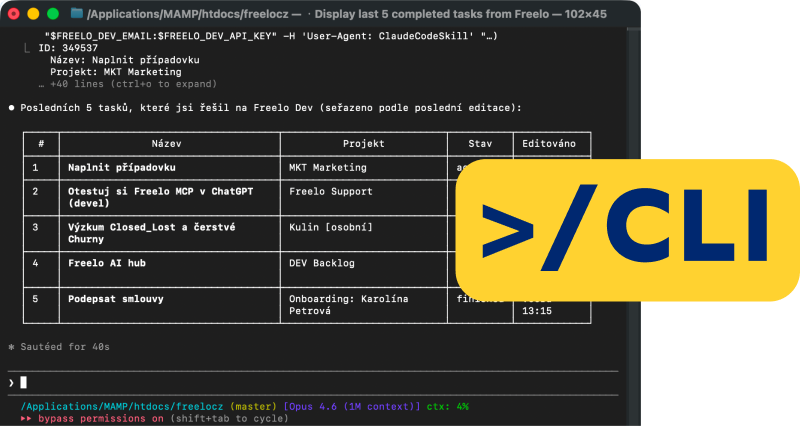
Freelo CLI is a small program that you install on your computer. With one command you can create a project or task, start a timer, write a comment or scan the whole company. Without opening a browser.
Terrminal? Don't worry. You write a freeloader and you're off.

ToDoo writes...
|
ToDoo assistant
|
Freelo MCP
|
Freelo CLI
|
Claude Freelo Skill
|
|
|---|---|---|---|---|
| What it is | AI partner built right into Freelo. It will help you with settings, functions and procedures. It doesn't control Freelo for you. | ”Socket” for AI assistants. Allows you to control Freelo from chat or terminal using any AI agent. | ”Tools” to the terminal. The program on your computer, which you control with commands: manually, in scripts and via AI agent. | ”Textbook” for AI. Teaches a Claude agent how to work with Freelo to save you time and make your job easier. |
| For whom | For every Freelo user, you don't install anything. | For anyone using AI assistant - the lowest barrier to entry. | For advanced users, automation, coding agents and developers. | For anyone who uses Claude Code for their work. |
| How to imagine | As a colleague on board, who knows Freelo inside out and can advise immediately. | Like allowing an app to access your calendar. From that point on, it can work with it. | Like a professional tool: versatile, fast, scriptable. | It's like a manual that an agent gets to know what he's doing. |
Skill is built right into the Freelo CLI. Every agent receives the know-how on how to use Freelo together with the CLI. Do you live more in an AI chat/app? Then reach for Freelo MCP. And you can consult TuDo directly in Freelo.
You need speed and bulk operations: set up ten tasks at once, search all projects, pull a month's worth of reports. Done in minutes instead of hours.
You use AI agents and want them to work with tasks as well. Through the Freelo CLI you give them hands: you input, the agent executes. And the scripts plug Freelo into your workflows too.
You work in a terminal and editor all day. Freelo CLI brings you tasks, comments and stopwatches right there, so you don't switch to the browser for every little thing.
Ask an agent ”What's on my desk today and what's overdue?” He'll go through your projects via the Freelo CLI and return a summary. You start the day with clear priorities, not clicking through an app.
How to get started with Freelo CLI After the deadline
 Today
Today
 Today
Today
 Today
Today
The meeting is over and you leave with a page of notes. You hand them to the agent and say: ”You turn it into a Web project.” The agent uses the CLI to create the tasks in the correct to-do list, you check them and move on. You don't miss any meeting requests.
Try it in Freelo Create tasks for the Web project based on the meeting notes.
May 18
May 20
May 22
May 25
Create tasks for the Web project based on the meeting notes.
May 18
May 20
May 22
May 25
Start and stop the stopwatch with a single command, without leaving the work in progress. And at the end of the month, you can pull up the work reports for the period as a ready-made basis for invoicing. No exports or manual calculations.
More about timekeeping in Freelo
Honza Novák
36 h
Anna Dvořáková
24 h
Petra Lišková
18 h
”Find everything related to Client X.” Freelo CLI scans projects, tasks and comments at once and returns results in one place. No more remembering which project it was in at the time.
Start with Freelo
3
Freelo CLI outputs are machine ready, so you can plug it into scripts and CI/CDs. After deploying the release, the script itself closes the task and adds a comment with a link to the release. Freelo becomes part of your development workflow.
Discuss deployment with crew
No remembering commands. Just tell the agent what you need in human terms and he'll translate it himself. Like this:
List my assignments after the deadline in the Web project.
tip #1

The answers are simpler than they look.
CLI stands for command-line interface, i.e. control via the command line. Freelo CLI is an official program that you install on your computer and use the freelo command to work with projects, tasks, stopwatches and timesheets. It works manually, in scripts and as a tool for AI agents.
TuDu is an AI partner built right into Freelo: it can help, but it doesn't control Freelo. MCP is a ”socket” for AI chat applications like Claude or ChatGPT. CLI is ”a” tool in the terminal: for developers, scripts and coding agents. And Claude Freelo Skill is ”a” textbook that teaches agents how to use Freelo correctly and is built right into the CLI. See above on this page for a detailed comparison.
I don't program, but the Freelo CLI lives in the terminal, so basic command line camaraderie comes in handy. And if you're using an AI agent, just type to it humanly: it composes the commands for you. You just type and check the result.
With everyone who can run commands on your computer: Claude Code, Cursor, Codex and others. You are not locked into one ecosystem. The agent also gets a built-in Freelo Skill with the CLI, so it knows how to use Freelo correctly.
No. The Freelo CLI is included with every Freelo account, you don't need any additional tariff.
You log into the Freelo CLI with the API key from your profile. The key will be stored securely in your computer's system vault, for example in Keychain on a Mac. The CLI and the agent only see data that you have access to in Freelo.
It doesn't replace, but complements. n8n and similar tools run in the cloud according to fixed scenarios. Freelo CLI works on your machine: interactively, in scripts, and with an AI agent that responds to what you just ask it to do.
In the blog article you will find installation instructions and first commands as well as all step-by-step use-cases. Technical details, API key login and AI agent mode are described in the help.



Register for free, install Freelo CLI and work with tasks directly from the terminal, from scripts or through your AI agent. No switching windows, no additional subscriptions.