Do you have a question about setting up or using Freelo? Ask ToDoo - our AI chatbot. Fast. Friendly. Right in the app.
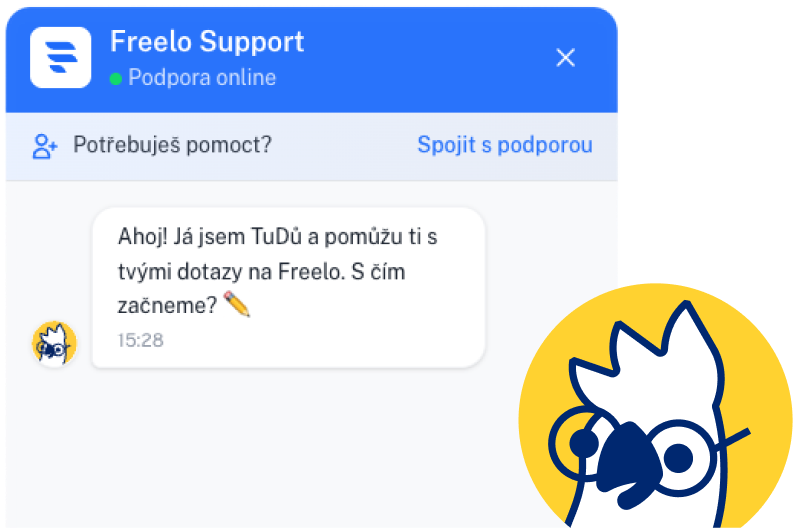
ToDoo is an AI chatbot built directly into Freelo. Just click on the parrot icon in the bottom right corner and ask anything from project settings to roles and accesses to timetracking or email integration. ToDoo responds instantly, clearly and 24/7.
I'm powered by Google Gemini and I've read every Freelo help article. Ask me anything!

ToDoo writes...

Newcomers especially appreciate ToDoo's helping hand. Instead of digging through the help center, they just ask a question and get a tailored answer.

Managers and team leaders don't have time to comb through documentation. ToDoo can help them set up roles, permissions, or reports in seconds.

In short, ToDoo is there for everyone who wants to get the most out of Freelo. No waiting, no awkward questions, no googling.
How to create a project? How to add a task? How to set a deadline or priority? TuDů can help you with every step of managing projects and tasks in Freelo.
More about ToDoo Feb. 17
 3
Feb. 26
3
Feb. 26


 MP
March 14
MP
March 14
Who can see what? How do I assign a project administrator? How can I check that an external user can't see internal discussions? ToDoo has answers to every question about roles and permissions.
How to ask ToDoo
Jana Králová
Captain
Marek Pospíšil
Administrator
Petra Lišková
Member
 Tomáš Král
Member
Tomáš Král
Member
 Lucie Kopecká
client
Guest
Lucie Kopecká
client
Guest
How do I start the timer? Where can I find last month's report? How do I set the hourly rate? ToDoo will guide you through time tracking step by step.
Just askHow do I change my password? How do I mute notifications? Where can I find my billing information? ToDoo knows exactly where each setting lives and will guide you straight there.
More about ToDoo
Marek Pospíšil He mentioned you in a comment
Homepage Content
Petra Lišková completed the task
Visual Design
Honza Novák He assigned you a task
Client Reporting
Anna Dvořáková commented
Banner Graphics
How do I connect Freelo with email, Google Calendar, or MS Teams? ToDoo can help with every integration and technical setup. Just ask — no question is too small.
Don't worry. Ask Slack
Notifications from Tasks
Slack
Notifications from Tasks
 Fakturoid
Invoicing
Fakturoid
Invoicing
 Raynet
CRM
Raynet
CRM
 Google Calendar
In both directions
Google Calendar
In both directions
 Gmail
Tasks created from e-mails
Gmail
Tasks created from e-mails
 Make
Automation
Make
Automation

Learn how ToDoo works under the hood, what it can do, and how to get the most out of it. Or jump straight into the help center.

Sign up, click the parrot icon in the bottom-right corner, and ask ToDoo anything.